Showing posts with label Google. Show all posts

Adsense : Email notification preferences keeps you update

How about - Google Adsense team members are sending you personalised account suggestions and messages like event invitations, information about webinars?. Yes that's true, Today, Inside Adsense the Google Adsense blog made such announcement. The announcement says that to reach to the publishers - adsense users, Google Adsnse is going to add a feature called Email Notification Preferences.


In few days this feature will be added to your adsense account where you can select which types of messages you would like to receive from adsense team. And anytime you can choose not receive such emails by visiting contact references.

Google Docs : Adds Insert Drawings feature

Google Docs : Free web-based word processor and spreadsheet, which allow you share and collaborate online. To make it more like Microsoft Word and PowerPoint. Google Docs added Insert Drawing feature as Shapes in MS Word and PPT. Google Docs Blog announced addtion of this feature to make rich, colorful presentation and spreadsheets. As it makes sense and MS Office and other such tools are providing this feature already why not Google Docs. Sometimes to illustrate your ideas more clearly there is no better way than drawing.
Insert image feature being most welcomed because i think it was missing from the beginning. Insert Drawings feature include number shapes required for drawing, it's similar to shapes in MS Word and PowerPoint. These shapes allows you to draw Flow Charts and Paintings. It will be fun for kids to draw paintings in Google Docs.

Interest-Based Ads : Adsense

Making ads more interesting
Today Google launched "interest-based" advertising as a beta test on our partner sites and on YouTube. Till now Google Adsense was showing ads based your interest at that particular moment, which means relevant to the content of that site. Because the content you are reading is of your interest for that moment.

Suppose you search for "Digital camera" on Google Search, it will give ads related to digital cameras. And then you read some Gardening blog, it will give you ads related to Gardening and Home. Which ads are completely different from previous search ads. What if you are not completely satisfied with search results you got and still in your mind you might be thinking about "Digital Cameras", so it will more relevant and effective to provide ads about Digital Cameras on Gardning blog. And this what Interest-Based ads is, because a keyword or content of site doesn't provide enough information about users interest to provide highly relevant ads.

Interest-Based advertising is making online advertising even more relevant and useful by using additional information about the websites people visit. Google will gradually introduce "interest-based" advertising as a beta test initially only on partner sites and YouTube. These ads will associate categories of interest — like sports, gardening, cars, pets — with your browser, based on the types of sites you visit and the pages you view and these interest categories to show you more relevant text and display ads.
In Interest-Based advertising to answer the question of privacy and choice Google is giving three important features that demonstrate commitment to transparency and user choice.

Transparency : Google Adsense clearly label most of the ads provided AdSense partner network and on YouTube. Click on the labels to get more information about how Google serve ads, and the information we use to show you ads.

Choice : Ads Preferences Manager, which lets you view, delete, or add interest categories associated with your browser so that you can receive ads that are more interesting to you.

Control : You can always opt out of the advertising cookie for the AdSense partner network here. To make sure that your opt-out decision is respected (and isn't deleted if you clear the cookies from your browser), Google have designed a plug-in for browser that maintains your opt-out choice.

So to take part in the Interest-Based Ads, go to the Ads Preference Manager and choose your labels of interest and opt out and then download The advertising cookie Opt-Out Plugin.

Add custom gadgets to Gmail

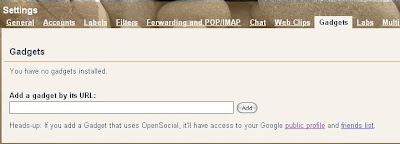
"Add any gadget by URL" a new feature added to Gmail by Labs. It adds an tab "Gadgets" to Gmail settings from where we can add custom gadgets to Gmail account. These new Gmail gadgets are designed to make our Gmail interface more inclusive by providing views into your other Google apps - without having to leave your Gmail inbox. So this feature makes easy access to daily use gadgets like Calender, Calculator, RSS feeds, Google Map search, To do list, and many more for more detail visit Google gadget directory.
then How to add gadgets to Gmail?


1. Login to your Gmail account.
2. Go to "Settings" -> "Labs"
3. Scroll down to "Add any gadget by URL" and check enable.
4. This will add an new tab "Gadgets" to Settings.
5. Under gadgets now you can add gadgets that you want by specifying address of it's xml file.
To add gadgets you can go toGoogle gadget directory.
To add gadget to Gmail select the gadget you want to add, copy it's xml file address copy and paste it into "Gadgets" and click add.
Like this   www.poturi.net/gadgets/calc/calc.xml to add Calculator.


Gmail : append your current location to your signature

On Tuesday, February 10, 2009 Gmail Labs added a new feature by which you can add your current location to your signature. Ok so i think Gmail has reduced one question that many people ask after reciving a mail is Where are you? or Where are you from?-in case of unknown Email address.
so to add your current location to your signature try this
1. Login to your Gmail account.
2. click on the link "Settings" in upper right corner.
3. Click on "Labs".
4. Scroll down to "Location in Signature" and check "Enable".
5. Then go to "Settings"->"General"
6. Scroll down to "Signature" and check "Append your location to the signature".
7. Reload and you are done.
Enjoy.

Google Earth 5.0 : with an ocean

Today Google earth launched it's another version Google Earth 5.0 with an ocean. Now it seems logical that Earth has ocean so do Google Earth. Actually Google earth had ocean but it was limited to surface view only. In this version we can fly under the sea water.
With ocean in Google Earth, you can:
    Dive beneath the surface and visit the deepest part of the ocean, the Mariana Trench
   Explore the ocean with top marine experts including National Geographic and BBC
     Learn about ocean observations, climate change, and endangered species
     Discover new places including surf, dive, and travel hot spots and shipwrecks
Google Earth 5.0 also adds some more features like
Historical Imagery: here we can now move back and forth in time to reveal imagery from years and even decades past, revealing changes over time.
Touring: we can create an easily share, narrated, fly-through tour just by clicking the record button and navigating through your tour destinations.
3D Mars: we can access a 3D map of the Red Planet featuring the latest high-resolution imagery, 3D terrain, and annotations showing landing sites and lots of other interesting features.
Download Google Earth 5.0 here

chrome for mac and linux

It's confirmed -
Chrome for Mac and Linux is in development phase and sevelopers are working hard to make it as soon as possible. And Chrome for Mac and Linux will be more stable, fast than Chrome for Windows. Mac and Linux Chrome is completely rewritten.

First Android phone from T-Mobile

The T-Mobile G1 with Google is the first commercially available phone to run on the 'Android' operating system, which empowers developers with tools to create and offer consumers applications that add value to their lives. This is one of many initiatives T-Mobile is working on to lead the industry in bringing real innovation to wireless customers.
T-Mobile’s G1 phone is going to be the first mobile phone based on Android. Android is the open source mobile operating system powered Google. G1 phone has a touch screen, a keyboard.
Different Google apps, like Gmail, Maps, Youtube, Contacts, Search,Calender and IM.
The HTC-built G1 phone comes with touch sreen, keyboard, a 3-megapixel camera, Wi-Fi enabled, connection to Amazon’s DRM-free MP3 music store, and an Android applications directory. The Google logo on back side of it.
Videos on YouTube show off some of the features of the G1.It looks like G1 phone is tightly tied to Google’s web-based email, contacts and calendar programs.
Before going to buy G1 phone make sure that you have an Google account. Because it can only synchronize the phone’s calendar and address book with Google online services unlike the iPhone, it doesn’t work with Microsoft Exchange, and Microsoft Outlook.
T-Mobile's G1 phone costs about $179 with a two-year contract.
T-Mobile is committed to helping customers. In 2007, T-Mobile became a founding member of the Open Handset Alliance, an initiative that is strongly committed to greater openness in the mobile industry.